
R2511-HP MSR Router Series Fundamentals Configuration Guide(V5)

49
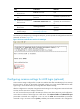
associate Device A's IP address with the Telnet redirect listening port, a user can use the telnet
DeviceA-IP-address command to log in to Device B. This Telnet redirect function enables a device to
provide Telnet service with its IP address protected.
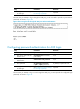
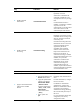
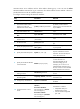
To configure common settings for AUX user interfaces:
Ste
p
Command
Remarks
1. Enter system view.
system-view N/A
2. Associate the Telnet redirect
listening port with an IP
address of the current device.
ip alias ip-address port-number
By default, a Telnet redirect
listening port is not associated with
any IP address.
3. Enter AUX interface view.
interface aux 0 N/A
4. Set the operating mode to
flow.
async mode flow The default mode is flow.
5. Enter one or more AUX user
interface views.
user-interface aux first-number
[ last-number ]
N/A
6. Set the baud rate.
speed speed-value
By default, the baud rate is 9600
bps.
7. Specify the parity check mode.
parity { even | mark | none |
odd | space }
The default setting is none, namely,
no parity check.
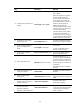
8. Specify the number of stop bits.
stopbits { 1 | 1.5 | 2 }
The default is 1.
Stop bits indicate the end of a
character. The more the bits, the
slower the transmission.
9. Specify the number of data bits
in each character.
databits { 5 | 6 | 7 | 8 }
By default, the number of data bits
in each character is 8.
The setting depends on the
character coding type. For
example, you can set it to 7 if
standard ASCII characters are to
be sent, and set it to 8 if extended
ASCII characters are to be sent.
10. Define a shortcut key for
starting a session.
activation-key character
By default, press Enter to start a
session.
11. Define a shortcut key for
terminating tasks.
escape-key { default | character }
By default, press Ctrl+C to
terminate a task.
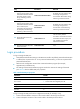
12. Configure stop bits detection.
stopbit-error intolerance
By default, stop bits detection is
disabled.
13. Configure the flow control
mode.
flow-control { hardware | none |
software }
flow-control hardware
flow-control-type1 [ software
flow-control-type2 ]
flow-control software
flow-control-type1 [ hardware
flow-control-type2 ]
The default is as follows:
• Independent AUX port—
Hardware flow control.
• Console and AUX integrated
port—Off.