
R2511-HP MSR Router Series Fundamentals Configuration Guide(V5)

48
Ste
p
Command
Remarks
8. Create a local user and enter
local user view.
local-user user-name N/A
9. Set a password for the local
user.
password { cipher | simple }
password
By default, no password is set.
10. Specifies the command level
of the local user.
authorization-attribute level level
Optional.
By default, the command level is
0.
11. Specify terminal service for
the local user.
service-type terminal
By default, no service type is
specified.
12. Configure common AUX user
interface settings.
See "Configuring common settings
for AUX login (
optional)."
Optional.
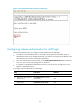
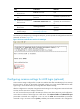
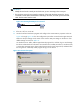
The next time you attempt to log in through the AUX port, you must provide the configured username and
password, as shown in Figure 22.
Figure 22 Schem
e authentication interface for AUX login
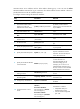
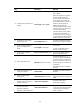
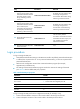
Configuring common settings for AUX login (optional)
Some common settings configured for an AUX user interface take effect immediately and can interrupt
the login session. To save you the trouble of repeated re-logins, use a login method different from AUX
login to log in to the device before you change AUX user interface settings.
After the configuration is complete, change the terminal settings on the configuration terminal and make
sure they are the same as the settings on the device.
You can connect a device (Device B) to the AUX port of the current device (Device A), and configure the
current device to redirect a Telnet login user to that device. If the redirect enable and redirect listen-port
port-number commands are configured, a user can use the telnet DeviceA-IP-address port-number
command to log in to Device B. If the ip alias ip-address port-number command is also configured to