
R2511-HP MSR Router Series Fundamentals Configuration Guide(V5)

46
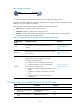
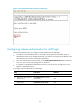
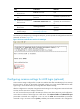
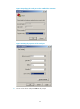
Figure 21 Password authentication interface for AUX login
Configuring scheme authentication for AUX login
Follow these guidelines when you configure scheme authentication for AUX login:
• To make the command authorization or command accounting function take effect, apply an
HWTACACS scheme to the intended ISP domain. This scheme must specify the IP address of the
authorization server and other authorization parameters.
• If the local authentication scheme is used, use the authorization-attribute level level command in
local user view to set the user privilege level on the device.
• If a RADIUS or HWTACACS authentication scheme is used, set the user privilege level on the
RADIUS or HWTACACS server.
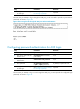
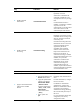
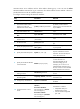
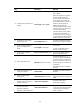
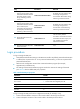
To configure scheme authentication for AUX login:
Ste
p
Command
Remarks
1. Enter system view.
system-view
N/A
2. Enter one or more AUX user
interface views.
user-interface aux first-number
[ last-number ]
N/A
3. Enable scheme
authentication.
authentication-mode scheme N/A