
R2511-HP MSR Router Series Fundamentals Configuration Guide(V5)

44
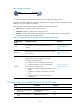
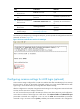
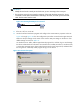
Figure 19 AUX login diagram
To control AUX logins, configure authentication and user privilege for AUX port users.
By default, password authentication applies to AUX login, but no login password is configured. To allow
AUX login, you must configure a password.
The following are authentication modes available for controlling AUX logins:
• None—Requires no authentication and is insecure.
• Password—Requires a password for accessing the CLI.
• Scheme—Uses the AAA module to provide local or remote authentication. You must provide a
username and password for accessing the CLI.
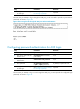
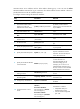
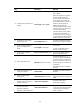
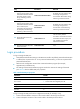
Table 17 Configuration required for different AUX login authentication modes
Authentication
mode
Configuration tasks Reference
None
Set the authentication mode to none for the AUX user
interface.
"Configuring none
authentication for AUX
login"
Password
Enable password authentication on the AUX user interface.
Set a password.
"Configuring password
authentication f
or AUX
login."
Scheme
Enable scheme authentication on the AUX user interface.
Configure local or remote authentication settings.
To configure local authentication:
18. Configure a local user and specify the password.
19. Configure the device to use local authentication.
To configure remote authentication:
20. Configure the RADIUS or HWTACACS scheme on the
device.
21. Configure the username and password on the AAA
server.
22. Configure the device to use the scheme for user
authentication.
"Configuring scheme
authentication f
or AUX
login."
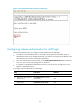
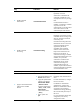
Configuring none authentication for AUX login
Ste
p
Command
Remarks
1. Enter system view.
system-view N/A
2. Enter one or more AUX user
interface view.
user-interface aux first-number
[ last-number ]
N/A
3. Enable none authentication
mode.
authentication-mode none N/A