
R2511-HP MSR Router Series Fundamentals Configuration Guide(V5)

42
Ste
p
Command
Remarks
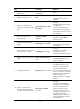
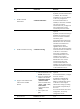
7. Enable command
authorization.
command authorization
Optional.
By default, command authorization
is disabled. The commands
available for a user only depend
on the user privilege level.
If command authorization is
enabled, a command is available
only if the user has the
commensurate user privilege level
and is authorized to use the
command by the AAA scheme.
8. Enable command accounting.
command accounting
Optional.
By default, command accounting is
disabled. The accounting server
does not record the commands
executed by users.
Command accounting allows the
HWTACACS server to record all
executed commands that are
supported by the device,
regardless of the command
execution result. This function helps
control and monitor user behaviors
on the device. If command
accounting is enabled and
command authorization is not
enabled, every executed
command is recorded on the
HWTACACS server. If both
command accounting and
command authorization are
enabled, only the authorized and
executed commands are recorded
on the HWTACACS server.
9. Exit to system view.
quit N/A
10. Apply an AAA authentication
scheme to the intended
domain.
a. Enter the ISP domain view:
domain domain-name
b. Apply the specified AAA
scheme to the domain:
authentication default
{ hwtacacs-scheme
hwtacacs-scheme-name
[ local ] | local | none |
radius-scheme
radius-scheme-name
[ local ] }
c. Exit to system view:
quit
Optional.
For local authentication, configure
local user accounts.
For RADIUS or HWTACACS
authentication, configure the
RADIUS or HWTACACS scheme
on the device and configure
authentication settings (including
the username and password) on
the server.
For more information about AAA
configuration, see Security
Configuration Guide.
11. Create a local user and enter
local user view.
local-user user-name N/A