
R2511-HP MSR Router Series Fundamentals Configuration Guide(V5)

33
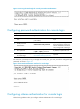
Ste
p
Command
Remarks
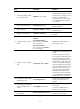
15. Set the idle-timeout timer.
idle-timeout minutes [ seconds ]
The default idle-timeout is 10
minutes. The system automatically
terminates the user's connection if
there is no information interaction
between the device and the user
within the idle-timeout time.
Setting idle-timeout to 0 disables the
idle-timeout function.
Logging in through Telnet
NOTE:
Telnet login is not supported in FIPS mode.
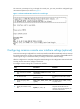
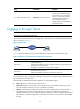
You can Telnet to the device for remote management, or use the device as a Telnet client to Telnet to other
devices, as shown in Figure 12.
Figure 12 Telnet login
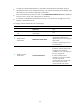
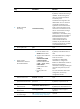
Table 14 shows the Telnet server and client configuration required for a successful Telnet login.
Table 14 Telnet server and Telnet client configuration requirements
Device role Re
q
uirements
Telnet server
Enable Telnet server.
Configure the IP address of a Layer 3 interface, and make sure the Telnet server
and client can reach each other.
Configure the authentication mode and other settings.
Telnet client
Run the Telnet client program.
Obtain the IP address of the Layer 3 interface on the server.
To control Telnet access to the device operating as a Telnet server, configure login authentication and
user privilege levels for Telnet users.
The following are authentication modes available for controlling Telnet logins:
• None—Requires no authentication and is insecure.
• Password—Requires a password for accessing the CLI. If your password was lost, log in to the
device through the console port to view or modify the password.
• Scheme—Uses the AAA module to provide local or remote authentication. You must provide a
username and password for accessing the CLI. If the password configured in the local user
database was lost, log in to the device through the console port to view or modify the password. If
the username or password configured on a remote server was lost, contact the server administrator
for help.