
R2511-HP MSR Router Series Fundamentals Configuration Guide(V5)

28
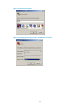
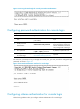
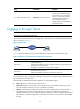
Figure 9 Accessing the CLI through the console port without authentication
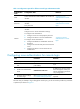
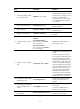
Configuring password authentication for console login
Ste
p
Command
Remarks
1. Enter system view.
system-view N/A
2. Enter console user interface
view.
user-interface console first-number
[ last-number ]
N/A
3. Enable password
authentication.
authentication-mode password
By default, you can log in to the
device through the console port
without authentication and have
user privilege level 3 after login.
4. Set a password.
set authentication password
{ cipher | simple } password
By default, no password is set.
5. Configure common settings
for console login.
See "Configuring common console
user interface s
ettings (optional)."
Optional.
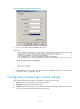
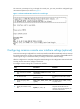
The next time you attempt to log in through the console port, you must provide the configured login
password, as shown in Figure 10.
Figure 10 Password authentication interface for console login
Configuring scheme authentication for console login
Follow these guidelines when you configure scheme authentication for console login: