
R2511-HP MSR Router Series Fundamentals Configuration Guide(V5)


22
Lo
g
in method Confi
g
uration re
q
uirements
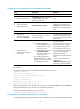
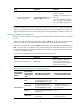
• Logging in through SSH
To use SSH service, complete the following configuration tasks:
• Enable the SSH server function and configure SSH attributes.
• Assign an IP address to a Layer 3 interface and make sure the
interface and the SSH client can reach each other.
• Enable scheme authentication for VTY login users.
• Configure the user privilege level of VTY login users.
• Local login through the AUX port
To enable AUX login, log in to the device through the console port,
and configure the password for password authentication, or change
the authentication mode and configure parameters for the new
authentication mode.
• Modem dial-in through the AUX
port
To enable modem dial-in, log in to the device through the console
port, and configure the password for password authentication, or
change the authentication mode and configure parameters for the
new authentication mode.
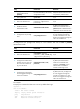
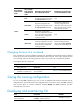
Logging in to the Web interface
To use Web service, complete the following configuration tasks:
• Assign an IP address to a Layer 3 interface.
• Configure a local user account for Web login, and assign a user
privilege level and the Web service to the account.
Logging in through SNMP
To use SNMP service, complete the following configuration tasks:
• Assign an IP address to a Layer 3 interface, and make sure the
interface and the NMS can reach each other.
• Configure SNMP basic parameters.
CLI user interfaces
The device uses user interfaces (also called "lines") to control CLI logins and monitor CLI sessions. You
can configure access control settings, including authentication, user privilege, and login redirect on user
interfaces. After users are logged in, their actions must be compliant with the settings on the user
interfaces assigned to them.
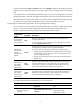
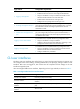
Users are assigned different user interfaces, depending on their login methods, as shown in Table 11.
Table 11 CLI login method and u
ser interface matrix
User interface Lo
g
in method
Console user interface Console port (EIA/TIA-232 DCE)
AUX user interface
AUX port (EIA/TIA-232 DTE, typically used for dial-in access through
modems)
True type terminal (TTY) user
interface
Asynchronous serial port (Serial port in asynchronous mode or Async
port)
Virtual type terminal (VTY) user
interface
Telnet or SSH