
R2511-HP MSR Router Series Fundamentals Configuration Guide(V5)


21
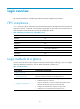
Login overview
This chapter describes the available login methods and their configuration procedures.
FIPS compliance
Table 9 shows the support of devices for the FIPS mode that complies with NIST FIPS 140-2 requirements.
Support for features, commands, and parameters might differ in FIPS mode and non-FIPS mode. For
more information about FIPS mode, see Security Configuration Guide.
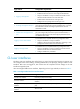
Table 9 Hardware and FIPS mode compatibility matrix
Hardware FIPS mode
MSR900 No.
MSR93X No.
MSR20-1X No.
MSR20 Yes.
MSR30 Yes except on MSR30-16.
MSR50 Yes.
MSR1000 Yes.
Login methods at a glance
You can access the device only through the console port at the first login. After login, you can configure
other login methods on the device, such as Telnet and SSH for remote access.
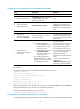
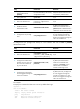
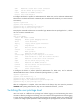
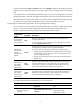
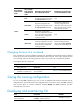
Table 10 Login methods
Lo
g
in method Confi
g
uration re
q
uirements
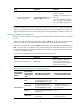
Logging in to the CLI:
• Logging in through the console
port for the first time
By default, login through the console port is enabled, no username or
password is required, and the user privilege level is 3.
• Logging in through Telnet
To use Telnet service, complete the following configuration tasks:
• Enable the Telnet server function.
• Assign an IP address to a Layer 3 interface and make sure the
interface and the Telnet client can reach each other.
• Configure the authentication mode for VTY login users.
• Configure the user privilege level of VTY login users.