
R2511-HP MSR Router Series Fundamentals Configuration Guide(V5)


18
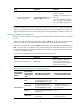
Ste
p
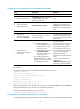
Command
Remarks
3. Configure the password for
the user privilege level.
super password [ level user-level ]
{ cipher | simple } password
If local authentication is involved,
this step is required.
By default, a privilege level has no
password.
If no user privilege level is specified
when you configure the command,
the user privilege level defaults to
3.
If local-only authentication is used, a console user interface user can switch to a higher privilege level,
even if the privilege level has not been assigned a password. Console user interface users include users
logged in through the console port and users logged in through the AUX port used as the console port.
Switching to a higher user privilege level
Before you switch to a higher user privilege level, obtain the required authentication data as described
in Table 8.
W
hen the privilege level switching authentication mode is scheme, a user has up to three opportunities
to enter the correct password. If three consecutive attempts fail, the switching operation fails.
When the login authentication mode is scheme and the privilege level switching authentication mode is
local, a user who fails to provide the correct password during five consecutive attempts must wait 15
minutes before trying again. Trying again before the 15-minute period elapses restores the wait timer to
15 minutes and restarts the timer.
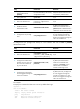
To switch the user privilege level, perform the following task in user view:
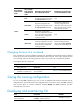
Task Command
Remarks
Switch the user privilege level. super [ level ]
When logging in to the device, a
user has a user privilege level,
which depends on user interface or
authentication user level.
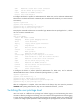
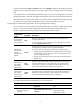
Table 8 Information required for user privilege level switching
User interface
authentication
mode
User privilege
level switching
authentication
mode
Information required for the
first authentication mode
Information required for the
second authentication mode
none/password
local
Password configured for the
privilege level on the device with
the super password command.
N/A
local scheme
Password configured for the
privilege level on the device with
the super password command.
Username and password
configured on the AAA server for
the privilege level.
scheme
Username and password for the
privilege level.
N/A
scheme local
Username and password for the
privilege level.
Local user privilege level
switching password.