
R2511-HP MSR Router Series Fundamentals Configuration Guide(V5)

10
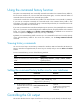
Pausing between screens of output
If the output being displayed is more than will fit on one screen, the system automatically pauses after
displaying a screen. By default, up to 24 lines can be displayed on a screen. To change the screen length,
use the screen-length screen-length command. For more information about this command, see
Fundamentals Command Reference. To control output, use keys in Table 5.
Table 5 Keys for controlling output
Ke
y
s Function
Space Displays the next screen.
Enter Displays the next line.
Ctrl+C Stops the display and cancels the command execution.
<PageUp> Displays the previous page.
<PageDown> Displays the next page.
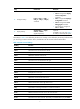
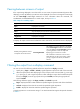
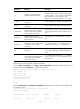
To display all output at one time and refresh the screen continuously until the final screen is displayed:
Task Command
Remarks
Disable pausing between screens
of output for the current session.
screen-length disable
The default for a session depends on the setting
of the screen-length command in user interface
view. The default of the screen-length command
is pausing between screens of output and
displaying up to 24 lines on a screen.
This command is executed in user view and
takes effect only for the current session. When
you log in again to the device, the default is
restored.
Filtering the output from a display command
You can use one of the following methods to filter the output from a display command:
• Specify the | { begin | exclude | include } regular-expression option at the end of the command.
• When the system pauses after displaying a screen of output, enter a forward slash (/), minus sign
(-), or plus sign (+), and a regular expression to filter subsequent output. The forward slash equals
the keyword begin, the minus sign equals the keyword exclude, and the plus sign equals the
keyword include.
The following definitions apply to the begin, exclude, and include keywords:
• begin—Displays the first line that matches the specified regular expression and all lines that follow.
• exclude—Displays all lines that do not match the specified regular expression.
• include—Displays all lines that match the specified regular expression.
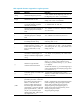
A regular expression is a case-sensitive string of 1 to 256 characters that supports the special characters
in Table 6.