
R2511-HP MSR Router Series Fundamentals Configuration Guide(V5)

154
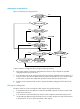
The USB disk for automatic configuration must be inserted to the device before the device starts up.
The configuration file intended for automatic configuration must meet the following requirements:
• Be named in the format device serial number.cfg or xxx.autodeploy.cfg, or use the name
autodeploy.cfg.
• Be saved in the root directory of usba0.
If the configuration file intended for automatic configuration is named in the format xxx.autodeploy.cfg,
make sure the root directory of usba0 has only one file named in this format. Otherwise, the automatic
configuration will fail.
If the device finds that the file autodeploy.cfg already exists when it saves copies of the configuration file
from the USB disk, the device changes the name of the existing file to autodeploy_bak.cfg first.
If the automatic configuration procedure is successfully completed, the device SYS LED flashes green
quickly for five seconds. If the automatic configuration fails, the device SYS LED flashes yellow quickly for
10 seconds.
Enabling automatic configuration from a USB disk
Ste
p
Command
Remarks
1. Enter system view.
system-view N/A
2. Enable automatic
configuration from a
USB disk.
autodeploy udisk enable
By default, automatic configuration from
a USB disk is enabled.