
R2511-HP MSR Router Series Fundamentals Configuration Guide(V5)

153
4. During the reboot, the device checks whether all commands in the main startup configuration file
are executed successfully. If yes, the automatic configuration succeeds. If not, the automatic
configuration fails, and the device writes a log entry to a log file that is named autodeploy.cfg.log
and saved in the root directory of the USB disk.
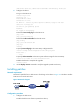
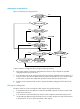
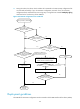
Figure 62 Automatic configuration from a USB disk
Deployment guidelines
The USB disk for automatic configuration must be inserted in the first USB interface of the device (usba0).
Device powered on (with usba0)
Found
device serial number.cfg in the root
directory of usba0?
Found
autodeploy.cfg in the root
directory of usba0?
No
No
Yes
Yes
The found
.cfg file has the same configuration
as the autodeploy.cfg.bak file on
the device?
Yes
Configuration is different or
autodeploy.cfg.bak is not found
All commands in the
startup configuration file are
executed successfully?
Automatic configuration
failed
Reboot the device
Execute the main startup
configuration file
Automatic
configuration
succeeds
No
No
Save two copies of the found .cfg file to the
device, one by the name autodeploy.cfg and the
other by the name autodeploy.cfg.bak
Found
xxx.autodeploy.cfg in the root directory
of usba0?
No
Yes
Operation successful?
No
Yes