
R2511-HP MSR Router Series Fundamentals Configuration Guide(V5)
146
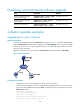
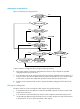
# Save the patch file patch_xxx.bin to the directory of the TFTP server. (Details not shown.)
2. Configure the device:
# Use the save command to save the running configuration. (Details not shown.)
# Examine the space of the Flash on the device. If the free space is not sufficient for the patches,
delete unused files to release space. (Details not shown.)
# Download patch_xxx.bin from the TFTP server to the root directory of the device's storage
media.
<Device> tftp 2.2.2.2 get patch_xxx.bin
# Install the patches.
<Device> system-view
[Device] patch install flash:
Patches will be installed. Continue? [Y/N]:y
Do you want to continue running patches after reboot? [Y/N]:y
Installing patches........
Installation completed, and patches will continue to run after reboot.
3. Use the display patch information command to verify that the patches have been installed and
running. (Details not shown.)