
R2511-HP MSR Router Series Fundamentals Configuration Guide(V5)

145
[FTP-Server-luser-aaa] authorization-attribute work-directory flash:/aaa
2. Configure the device:
# Log in to the FTP server.
<Device> ftp 2.2.2.2
Trying 2.2.2.2 ...
Press CTRL+K to abort
Connected to 2.2.2.2.
220 WFTPD 2.0 service (by Texas Imperial Software) ready for new user
User(2.2.2.2:(none)):aaa
331 Give me your password, please
Password:
230 Logged in successfully
# Download new-config.cfg from the FTP server.
[ftp] ascii
[ftp] get new-config.cfg
# Download soft-version2.bin from the FTP server.
[ftp] binary
[ftp] get soft-version2.bin
[ftp] bye
<Device>
# Specify new-config.cfg as the main startup configuration file.
<Device> startup saved-configuration new-config.cfg main
Please wait...
... Done!
# Specify soft-version2.bin as the main system software image for the next startup.
<Device> boot-loader file soft-version2.bin main
# Reboot the device to complete the upgrade.
<Device> reboot
3. Use the display version command to verify the upgrade. (Details not shown.)
Installing patches
Network requirements
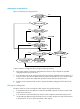
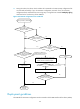
Download a patch file from a TFTP server to fix the bug on the device in Figure 58. The device and the
TFTP server can reach each other.
Figure 58 Network diagram
Configuration procedure
1. Configure the TFTP server:
# Enable the TFTP server function. (Details not shown.)