
R2511-HP MSR Router Series Fundamentals Configuration Guide(V5)

144
Displaying and maintaining software upgrade
Task Command Remarks
Display information about the
system software image.
display boot-loader [ | { begin | exclude
| include } regular-expression ]
Available in any view.
Display information about the
patch package.
display patch [ | { begin | exclude |
include } regular-expression ]
Available in any view.
Display patch information.
display patch information [ | { begin |
exclude | include } regular-expression ]
Available in any view.
Software upgrade examples
Upgrading the system software
Network requirement
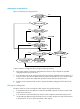
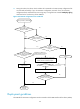
The current system software version is soft-version1 for the device in Figure 57. The latest system software
image soft-version2.bin and the latest configuration file new-config.cfg are both saved in the aaa
directory of the FTP server. The device and the FTP server can reach each other, and the PC and the
device can reach each other.
Upgrade the software version of the device to soft-version2 and configuration file to new-config.
Figure 57 Network diagram
Configuration procedure
1. Configure the FTP server (the configuration varies with server vendors):
# Set the access parameters for the FTP client (including enabling the FTP server function, setting
the FTP username to aaa and password to hello, and assign the FTP user the right to access the
flash:/aaa directory).
<FTP-Server> system-view
[FTP-Server] ftp server enable
[FTP-Server] local-user aaa
[FTP-Server-luser-aaa] password cipher hello
[FTP-Server-luser-aaa] service-type ftp