
R2511-HP MSR Router Series Fundamentals Configuration Guide(V5)



135
Upgrading software
You can use the CLI or Boot menu to upgrade software. This chapter describes only upgrading the
software and installing hotfixes from the CLI.
Upgrading software includes upgrading the BootWare (called "bootrom" in CLI) and system software.
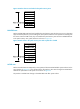
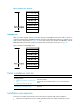
Each time the device is powered on, it runs the BootWare image to initialize hardware and display
hardware information, and then runs the system software image (called the "boot file" in software code)
so you can access the software features, as shown in Figure 51.
Figure 51 System startup process
FIPS compliance
Table 29 shows the support of devices for the FIPS mode that complies with NIST FIPS 140-2 requirements.
Support for features, commands, and parameters might differ in FIPS mode and non-FIPS mode. For
more information about FIPS mode, see Security Configuration Guide.
Table 29 Hardware and FIPS mode compatibility matrix
Hardware FIPS mode
MSR900 No.
MSR93X No.
MSR20-1X No.
MSR20 Yes.
Start
BootWare runs
Press Ctrl+B
Run system
software image
Enter Boot menu to
upgrade BootWare or
system software
Yes
No
Select the
Reboot option to
reboot the device
Enter CLI
Finish