
R2511-HP MSR Router Series Fundamentals Configuration Guide(V5)


133
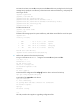
# Examine the storage medium of the device for insufficiency or impairment. If no sufficient free
space is available, use the fixdisk command to fix the storage medium or use the
delete/unreserved file-url command to delete unused files. (Details not shown.)
# Download system software image file newest.bin from the PC.
<Sysname> tftp 1.2.1.1 get newest.bin
# Upload a configuration file config.cfg to the TFTP server.
<Sysname> tftp 1.2.1.1 put config.cfg configback.cfg
# Specify newest.bin as the main system software image file for the next startup.
<Sysname> boot-loader file newest.bin main
IMPORTANT:
The system software image file used for the next startup must be saved in the root directory of the
storage medium. You can copy or move a file to the root directory.
# Reboot the device and the software is upgraded.
<Sysname> reboot