
R2511-HP MSR Router Series Fundamentals Configuration Guide(V5)


131
Using the device as a TFTP client
The device provides the following modes for downloading a new file from a TFTP server:
• Normal download—The new file is written directly to the storage medium and overwrites the old file
that has the same name as it. If file download is interrupted, both old and new files are lost.
• Secure download—The new file is downloaded to memory and will not be written to the storage
medium until the whole file is obtained. A download failure does not affect the old file that has the
same name as the old file.
To avoid undesired file loss, use the secure download mode. If you use the normal download mode
because of insufficient memory, assign the new file a file name unique in the storage medium.
You can use the tftp client source command to specify a source IP address or source interface for the
TFTP packets sent by the device. If a source interface (typically, a loopback or dialer interface) is
specified, its primary IP address is used as the source IP address for the TFTP packets. The source
interface and source IP address settings overwrite each other.
The tftp client source command setting applies to all TFTP sessions. When you set up a TFTP session with
the tftp command, you can also specify a different source IP address for the TFTP session.
IMPORTANT:
To avoid TFTP connection failures, when you specify a source interface for TFTP packets, make sure the
interface has been assigned a primary IP address.
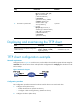
To use the device as a TFTP client:
Ste
p
Command
Remarks
1. Enter system view.
system-view N/A
2. Use an ACL to control the
client's access to TFTP servers.
tftp-server [ ipv6 ] acl acl-number
Optional.
By default, no ACL is used for
access control.
3. Specify a source IP address
for outgoing TFTP packets.
tftp client source { interface
interface-type interface-number | ip
source-ip-address }
Optional.
By default, the primary IP
address of the output interface is
used as the source IP address.
4. Return to user view.
quit N/A