
R2511-HP MSR Router Series Fundamentals Configuration Guide(V5)


130
Configuring TFTP
NOTE:
TFTP is not supported in FIPS mode.
Trivial File Transfer Protocol (TFTP) is a simplified version of FTP for file transfer over secure reliable
networks. TFTP uses UDP port 69 for connection establishment and data transmission. In contrast to
TCP-based FTP, TFTP requires no authentication or complex message exchanges, and is easier to deploy.
TFTP supports the following transfer modes:
• Binary mode—Used to transfer image files, such as .bin and .btm files.
• ASCII mode—Used to transfer text files, such as .txt, .bat, and .cfg files.
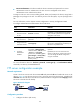
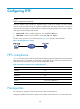
The device can operate only as a TFTP client (see Figure 49) to upload or do
wnload files.
Figure 49 TFTP application scenario
FIPS compliance
Table 26 shows the support of devices for the FIPS mode that complies with NIST FIPS 140-2 requirements.
Support for features, commands, and parameters might differ in FIPS mode and non-FIPS mode. For
more information about FIPS mode, see Security Configuration Guide.
Table 27 Hardware and FIPS mode compatibility matrix
Hardware FIPS mode
MSR900 No.
MSR93X No.
MSR20-1X No.
MSR20 Yes.
MSR30 Yes except on MSR30-16.
MSR50 Yes.
Prerequisites
Run a TFTP server program on the file host and set a TFTP working directory.
Configure IP addresses and routes to make sure the device and the TFTP server can reach each other.