
R2511-HP MSR Router Series Fundamentals Configuration Guide(V5)


127
• Remote authentication—The device sends the client's username and password to a remote
authentication server for authentication. The user account is configured on the remote
authentication server rather than the device.
To assign an FTP user write access (including upload, delete, and create) to the device, assign level-3
(Manage) user privileges to the user. For read-only access to the file system, any user privilege level is
OK.
For more information, see the chapter on AAA configuration in Security Configuration Guide.
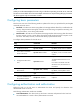
To configure authentication and authorization for the FTP server:
Ste
p
Command
Remarks
1. Enter system view.
system-view N/A
2. Create a local user
account and enter
its view.
local-user user-name
By default, no authorized local user account
exists, and the system does not support FTP
anonymous user access.
3. Set a password for
the user account.
password { simple | cipher }
password
N/A
4. Assign FTP service
to the user account.
service-type ftp
By default, no service type is specified. If the
FTP service is specified, the root directory of
the device is by default used.
5. Configure
authorization
attributes.
authorization-attribute { acl
acl-number | callback-number
callback-number | idle-cut minute
| level level | user-profile
profile-name | user-role { guest |
guest-manager | security-audit } |
vlan vlan-id | work-directory
directory-name } *
Optional.
By default, FTP users can access the root
directory of the device, and the user level is 0.
You can change the default configuration
using this command.
For more information about the local-user, password, service-type ftp, and authorization-attribute
commands, see Security Command Reference.
FTP server configuration example
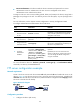
Network requirements
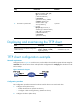
Create a local user account with the username abc and password abc and enable FTP server on the
device in Figure 48. U
se the user account to log in to the FTP server from the FTP client, upload the file
newest.bin from the FTP client to the FTP server, and download the configuration file config.cfg from the
FTP server to the FTP client for backup.
Figure 48 Network diagram
Configuration procedure
1. Configure the device (FTP server):