
R2511-HP MSR Router Series Fundamentals Configuration Guide(V5)


124
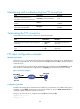
Maintaining and troubleshooting the FTP connection
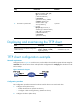
Task Command
Remarks
Display the help information of
FTP-related commands on the FTP server.
remotehelp [ protocol-command ] N/A
Enable information display in a detailed
manner.
verbose
By default, the function is
enabled.
Enable FTP related debugging when the
device acts as the FTP client.
debugging
By default, the function is
disabled.
Terminating the FTP connection
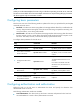
To terminate your FTP connection, perform one of the following tasks:
Task Command
Remarks
Terminate the FTP connection without exiting FTP
client view.
• disconnect
• close
Use either command in FTP
client view.
Terminate the FTP connection and return to user
view.
• bye
• quit
Use either command in FTP
client view.
FTP client configuration example
Network requirements
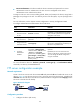
As shown in Figure 47, the device acts as the FTP client and the PC acts as the FTP server. The device and
the PC can reach each other. An account with the username abc and password abc is already configured
on the FTP server.
Log in to the FTP server from the FTP client, download the system software image file newest.bin from the
PC to the device, and upload the configuration file config.cfg from the device to the PC for backup.
Figure 47 Network diagram
Configuration procedure
# Examine the storage space of the device for insufficiency or impairment. If no sufficient free space is
available, use the fixdisk command to fix the storage medium or use the delete/unreserved file-url
command to delete unused files. (Details not shown.)
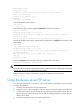
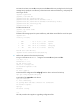
# Log in to the server at 10.1.1.1 using the username abc and password abc.
<Sysname> ftp 10.1.1.1
Trying 10.1.1.1