
R2511-HP MSR Router Series Fundamentals Configuration Guide(V5)


121
Using the device as an FTP client
To connect to an FTP server or enter FTP client view, make sure the following requirements are met:
• You have level-3 (Manage) user privileges on the device. In FTP client view, whether a directory or
file management command can be successfully executed depends on the authorization set on the
FTP server.
• The device and the FTP server can reach each other.
• You have a user account (including the username, password, and authorization) on the FTP server.
If the FTP server supports anonymous FTP, you can directly access the FTP server without a username
and password.
Establishing an FTP connection
Before you can access the FTP server, use the ftp command in user view or use the open command in FTP
client view to establish a connection to the FTP server.
You can use the ftp client source command to specify a source IP address or source interface for the FTP
packets sent by the device. If a source interface (typically, a loopback or dialer interface) is specified,
its primary IP address is used as the source IP address for the FTP packets sent by the device. The source
interface and source IP address settings overwrite each other.
The ftp client source command setting applies to all FTP sessions. When you set up an FTP session using
the ftp or ftp ipv6 command, you can also specify a different source IP address for the FTP session.
IMPORTANT:
To avoid FTP connection failures, when you specify a source interface for FTP packets, make sure the
interface has been assigned a primary IP address.
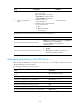
To establish an IPv4 FTP connection:
Ste
p
Command
Remarks
1. Enter system view.
system-view N/A
2. Specify a source IP address
for outgoing FTP packets.
ftp client source { interface interface-type
interface-number | ip source-ip-address }
Optional.
By default, the primary IP
address of the output interface
is used as the source IP
address.
3. Return to user view.
quit N/A