
R2511-HP MSR Router Series Fundamentals Configuration Guide(V5)


118
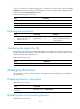
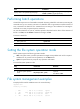
Task Command
Display data on the specified physical page.
display nandflash page-data page-value [ | { begin |
exclude | include } regular-expression ]
Performing batch operations
A batch file comprises a set of executable commands. Executing a batch file is the same as executing the
commands one by one. However, execution of a batch file does not guarantee successful execution of
every command in the batch file. If a command has error settings or the conditions for executing the
command are not met, the system skips this command.
You can edit a batch file on your PC, and then upload or download it to the device. If the extension of
the file is not .bat, use the rename command to change it to .bat.
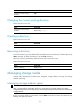
To execute a batch file:
Step Command
1. Enter system view.
system-view
2. Execute a batch file.
execute filename
Setting the file system operation mode
The file systems support the following operation modes:
• alert—The system warns you about operations that might cause problems such as file corruption
and data loss. To prevent incorrect operations, use the alert mode.
• quiet—The system does not prompt for any operation confirmation.
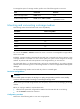
To set the file system operation mode:
Step Command Remarks
1. Enter system view.
system-view N/A
2. Set the file system operation
mode.
file prompt { alert | quiet }
Optional.
The default is alert.
File system management examples
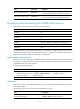
# Display the files and the subdirectories in the current directory.
<Sysname> dir
Directory of flash:/
0 drw- - Feb 16 2006 11:45:36 logfile
1 -rw- 1218 Feb 16 2006 11:46:19 config.cfg
2 drw- - Feb 16 2006 15:20:27 test
3 -rw- 184108 Feb 16 2006 15:30:20 aaa.bin