
R2511-HP MSR Router Series Fundamentals Configuration Guide(V5)


117
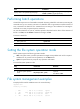
Task Command
Remarks
Mount a storage medium. mount device
By default, a storage medium is automatically mounted
and in mounted state when connected to the system.
Unmount a storage medium. umount device
By default, a storage medium is automatically mounted
and in mounted state when connected to the system.
Displaying and maintaining the NAND Flash memory
The following matrix shows the feature and router compatibility:
Hardware NAND Flash memor
y
com
p
atible
MSR900 No.
MSR93X Yes.
MSR20-1X No.
MSR20 No.
MSR30 Yes only on MSR30-10, MSR30-11E, and MSR30-11F.
MSR50 No.
MSR1000 Yes.
The physical space of the NAND Flash memory is divided into multiple blocks, each of which is
subdivided into multiple pages. The NAND Flash memory is erased on a block basis and read on a
page basis; the memory spaces are allocated on a page basis.
Displaying and repairing bad blocks
Bad block ratio varies with products of different vendors. Bad blocks cannot be used to store data, and
the system has to skip the bad blocks when it allocates storage spaces to files. You can get the locations
of bad blocks and repair them at the CLI.
To display and repair bad blocks:
Ste
p
Command
Remarks
1. Display the number and
location of bad blocks in the
NAND Flash memory.
display nandflash badblock-location
[ | { begin | exclude | include }
regular-expression ]
Available in any view.
2. Repair bad blocks.
fixdisk device Available in user view.
Checking files
After files are written to the NAND Flash memory, use the following commands together to check the
content of these files.
To check files, perform one of the following commands in any view:
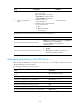
Task Command
Display the space distribution of the specified file in
the NAND Flash memory
display nandflash file-location filename [ | { begin |
exclude | include } regular-expression ]