
R2511-HP MSR Router Series Fundamentals Configuration Guide(V5)



109
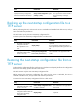
Task Command
Remarks
Specify the startup configuration
file to be used at the next startup.
startup saved-configuration cfgfile
[ backup | main ]
The configuration file must use
the .cfg extension and be saved in
the root directory of storage
media.
Backing up the next-startup configuration file to a
TFTP server
Before performing this task, make sure the server is reachable and enabled with TFTP service, and you
have read and write permissions.
This task backs up only the main next-startup configuration file.
To back up the main next-startup configuration file to a TFTP server:
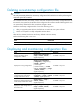
Step Command Remarks
1. Verify that a next-startup
configuration file has
been specified in user
view.
display startup
Optional.
If no next-startup configuration file has
been specified, the backup operation will
fail.
2. Back up the next-startup
configuration file to a TFTP
server in user view.
backup startup-configuration
to dest-addr [dest-filename ]
This command is not supported in FIPS
mode.
.
Restoring the next-startup configuration file from a
TFTP server
To download a configuration file from a TFTP server to the device and specify the file as the configuration
file for the next startup, perform the task in this section.
This task restores only the main next-startup configuration file.
Before restoring the next-startup configuration file, make sure the server is reachable, the server is
enabled with TFTP service, and you have read and write permissions.
To restore the main next-startup configuration file from a TFTP server:
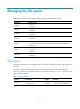
Step Command Remarks
1. Restore the main next-startup
configuration file from a TFTP
server in user view.
restore startup-configuration from
src-addr src-filename
This command is not supported in
FIPS mode.
2. Verify that the specified
configuration file has been set
as the main next-startup
configuration file.
display startup Optional.