
R2511-HP MSR Router Series Fundamentals Configuration Guide(V5)



106
• Overwrite the configuration file—The system uses the running configuration to overwrite the old
configuration file on the device without backing up the file.
Make sure the storage medium has enough space for the backup configuration file and the new
next-startup configuration file.
To load the backup configuration file after a software downgrade, specify the backup file as the
next-startup configuration file.
Configuring configuration rollback
To replace the running configuration with the configuration in a configuration file without rebooting the
device, use the configuration rollback function. This function helps you revert to a previous configuration
state or adapt the running configuration to different network environments.
The configuration rollback function compares the running configuration against the specified
replacement configuration file and handles configuration differences as follows:
• If a command in the running configuration is not in the replacement file, executes its undo form.
• If a command in the replacement file is not in the running configuration, adds it to the running
configuration.
• If a command has different settings in the running configuration and the configuration file, replaces
its running configuration with the setting in the configuration file.
To facilitate configuration rollback, the configuration archive function is developed. This function enables
the system to automatically save the running configuration at regular intervals as checkpoint references.
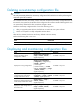
Configuration task list
Task Remarks
Configuring configuration archive parameters Required.
• Enabling automatic configuration archiving
• Manually archiving running configuration
Required.
Use either method.
Rolling back configuration Required.
Configuring configuration archive parameters
Before archiving the running configuration, either manually or automatically, you must configure a file
directory and file name prefix for configuration archives.
Configuration archives are saved with the file name format prefix_serial number.cfg, for example,
20080620archive_1.cfg and 20080620archive_2.cfg. The serial number is automatically assigned from
1 to 1000, increasing by 1. After the serial number reaches 1000, it restarts from 1.
After you change the file directory or file name prefix, or reboot the device, the old configuration archives
are regarded as common configuration files, the configuration archive counter resets, and the display
archive configuration command does not display them. The serial number for new configuration archives
starts from 1.
After the maximum number of configuration archives is reached, the system deletes the oldest archive for
the new archive.
To configure configuration archive parameters: