
R2511-HP MSR Router Series Fundamentals Configuration Guide(V5)



100
Disabling the USB ports
Before you disable the USB ports, make sure the USB ports are not being used for data read/write
operation. Otherwise, the operation might fail.
Disabling the USB ports also disables the USB-based storage and 3G functions.
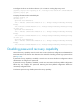
To disable the USB ports:
Task Command
Remarks
Disable the USB ports usb disable Available in system view.
Displaying and maintaining device management
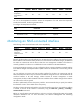
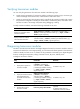
The following matrix shows the feature and router compatibility:
Feature MSR900 MSR93
X
MSR20-1
X
MSR20
MSR30
MSR50 MSR1000
Display the
temperature
information of the
router
No No No Yes Yes Yes Yes
Display the
operating state of
fans
No No No Yes Yes Yes Yes
Display state of
the RPS
No No No No
Yes
(except the
MSR30-1X
routers)
Yes No
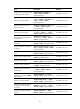
For diagnosis or troubleshooting, you can use separate display commands to collect running status data
module by module, or use the display diagnostic-information command to bulk collect running data for
multiple modules. The display diagnostic-information command equals this set of commands: display
clock, display version, display device, and display current-configuration.
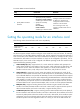
Task Command Remarks
Display system version
information.
display version [ | { begin | exclude |
include } regular-expression ]
Available in any view.
Display the system time and date.
display clock [ | { begin | exclude |
include } regular-expression ]
Available in any view.
Display the terminal user
information.
display users [ all ] [ | { begin | exclude
| include } regular-expression ]
Available in any view
Display information about the users
that have logged in to the device
but are not under user view.
display configure-user [ | { begin |
exclude | include } regular-expression ]
Available in any view.
Display the software and
hardware copyright statements.
display copyright [ | { begin | exclude |
include } regular-expression ]
Available in any view.