
R2511-HP MSR Router Series Fundamentals Configuration Guide(V5)



98
Ethernet packet transmission by switching the interface card to operate in EFM mode, thus
protecting user investment and improving packet transmission speed by avoiding ATM devices from
converting packets between Ethernet packets and ATM cells.
• 3G modem (PPP/Ethernet)—Supports switching between PPP mode and Ethernet mode. In PPP
mode, the link layer protocol is PPP and the network layer protocol is IP. In Ethernet mode, the link
layer protocol is Ethernet and the network layer protocol is IP.
To make the configured working mode take effect, restart the device or hot swap the interface card (if the
interface card supports hot swapping) after you change the working mode.
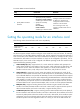
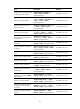
To configure the operating mode of an interface card:
Ste
p
Command
Remarks
1. Enter system view.
system-view N/A
2. Set the operating mode of an
interface card.
card-mode slot slot-number
mode-name
Optional.
Different interface cards support
different operating modes:
• CPOS interface card: e1, t1 e,
and t.
• ESM interface card: ipsec and
ssl.
• G.SHDSL.BIS interface card:
atm, auto, and efm.
• 3G modem interface card:
ppp and ethernet.
Clearing unused 16-bit interface indexes
The device must maintain persistent 16-bit interface indexes and keep one interface index match one
interface name for network management. After deleting a logical interface, the device retains its 16-bit
interface index so the same index can be assigned to the interface at interface re-creation.
To avoid index depletion causing interface creation failures, you can clear all 16-bit indexes that have
been assigned but not in use. The operation does not affect the interface indexes of the interfaces that
have been created but the indexes assigned to re-recreated interfaces might change.
A confirmation is required when you execute this command. The command will not run if you fail to make
a confirmation within 30 seconds or enter N to cancel the operation.
To clear unused 16-bit interface indexes, execute one of the following commands in user view:
Task Command
Clear unused 16-bit interface indexes. reset unused porttag
Verifying and diagnosing transceiver modules
This section describes how to verify and diagnose transceiver modules.