
R2511-HP MSR Router Series Fundamentals Configuration Guide(V5)



96
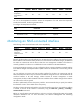
Feature MSR900 MSR93
X
MSR20-1
X
MSR20
MSR30 MSR50 MSR1000
Configure
temperature
thresholds for a
card
No No No Yes Yes Yes No
You can set the temperature threshold to monitor the temperature of a card. When the temperature
reaches the thresholds, the device generates alarms.
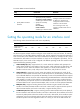
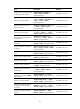
To configure the temperature thresholds:
Ste
p
Command
Remarks
1. Enter system view.
system-view N/A
2. Configure the temperature
threshold for a card.
temperature-limit slot-number
lower-value upper-value
Optional.
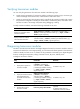
Monitoring an NMS-connected interface
The following matrix shows the feature and router compatibility:
Feature MSR900 MSR93
X
MSR20-1
X
MSR20
MSR30 MSR50 MSR1000
Configure the
monitored
interfaces for the
NMS
Yes Yes Yes No No No Yes
Typically, the device does not send notifications to its NMS when the IP address of an interface changes.
If the IP address of the interface used by the device to communicate with the NMS changes, the NMS will
be unable to communicate with the device unless the new management IP address of the device is
manually updated or the device is re-added with the new IP address to the NMS database.
To ensure management continuity, you can configure the device to monitor the NMS connected interface
for IP address changes and notify the NMS to update with the new IP address for communicating with the
device.
You can configure one primary and one secondary interface for the device to communicate with the
NMS, but the device monitors only one of them for IP address change at one time. If the IP address of the
monitored interface in UP state changes, whether because of manual reassignment or DHCP
reassignment, the device notifies the NMS of the new IP address. The IP address changes of the interface
not under monitor will be ignored.
The device preferentially monitors the primary interface. HP recommends that you specify the interface
that has better route or more reliable link as the primary.
The device changes the monitored interface only when the interface goes down, the interface IP address
is deleted, or the role of the interface is removed by using the undo nms { primary | secondary }
monitor-interface command.
Before you specify NMS-connected interfaces, make sure you have configured the NMS as the SNMP
notification destination host. For more information, see Network Management and Monitoring
Configuration Guide.