
R2511-HP MSR Router Series Fundamentals Configuration Guide(V5)



95
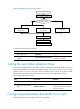
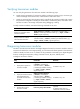
Figure 45 Handling console login password loss
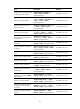
To disable password recovery capability:
Ste
p
Command
Remarks
1. Enter system view.
system-view N/A
2. Disable password recovery
capability.
undo password-recovery enable
By default, password recovery
capability is enabled.
Setting the port status detection timer
Some protocols might shut down ports under specific circumstances. For example, MSTP shuts down a
BPDU guard–enabled port when the port receives a BPDU. In this case, you can set the port status
detection timer. If the port is still down when the detection timer expires, the protocol module
automatically cancels the shutdown action and restores the port to its original physical status.
To set the port status detection timer:
Step Command Remarks
1. Enter system view.
system-view N/A
2. Set the port status detection
timer.
shutdown-interval time
Optional.
By default, the port status detection
timer is 30 seconds.
Configuring temperature thresholds for a card
The following matrix shows the feature and router compatibility:
Password recovery
capability enabled?
Y
N
Save the running configuration
Skip Authentication for
Console Login
Reboot the device
Configure new password
in system view
Console login password lost
Reboot the device to access
the extended Boot ROM menu
Skip Current System
Configuration
Restore to Factory Default
Configuration