
R2511-HP MSR Router Series Fundamentals Configuration Guide(V5)



93
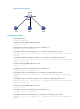
Figure 44 Network diagram
Configuration procedure
# Enter system view.
<Sysname> system-view
# Create a job named pc1, and enter its view.
[Sysname] job pc1
# Configure the job to be executed in the view of Ethernet 1/1.
[Sysname-job-pc1] view ethernet 1/1
# Configure the device to enable Ethernet 1/1 at 8:00 on working days every week.
[Sysname-job-pc1] time 1 repeating at 8:00 week-day mon tue wed thu fri command undo
shutdown
# Configure the device to shut down Ethernet 1/1 at 18:00 on working days every week.
[Sysname-job-pc1] time 2 repeating at 18:00 week-day mon tue wed thu fri command shutdown
[Sysname-job-pc1] quit
# Create a job named pc2, and enter its view.
[Sysname] job pc2
# Configure the job to be executed in the view of Ethernet 1/2.
[Sysname-job-pc2] view ethernet 1/2
# Configure the device to enable Ethernet 1/2 at 8:00 on working days every week.
[Sysname-job-pc2] time 1 repeating at 8:00 week-day mon tue wed thu fri command undo
shutdown
# Configure the device to shut down Ethernet 1/2 at 18:00 on working days every week.
[Sysname-job-pc2] time 2 repeating at 18:00 week-day mon tue wed thu fri command shutdown
[Sysname-job-pc2] quit
# Create a job named pc3, and enter its view.
[Sysname] job pc3
# Configure the job to be executed in the view of Ethernet 1/3.
[Sysname-job-pc3] view ethernet 1/3
# Configure the device to enable Ethernet 1/3 at 8:00 on working days every week.
[Sysname-job-pc3] time 1 repeating at 8:00 week-day mon tue wed thu fri command undo
shutdown