
HP UPS Management Module Installation and Configuration Guidelines for VMware ESX

8
Configuring VMware ESX settings
For each VMware server in your configuration, you must configure the startup and shutdown settings
for each guest operating system.
Note:
Depending on your VMware ESX version, the steps and screens described
in this section might vary.
You can configure the automatic startup and shutdown properties, as well as the delay settings for the
guest operating systems. The startup and shutdown settings are associated with the VMware server
configuration and can only be changed using the vSphere application on the Virtual Console
machine.
To configure the VMware settings:
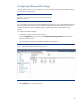
1. In the Inventory panel, select the VMware server.
Click the Configuration tab, and then click Virtual Machine Startup/Shutdown in the left frame
under the Software section.
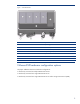
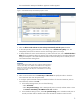
The Virtual Machine Startup and Shutdown settings window appears.
Figure 5. Virtual Machine Startup and Shutdown settings window
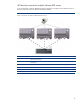
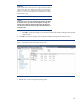
2. Click Properties in the upper right corner.