
HP UPS Management Module Installation and Configuration Guidelines for VMware ESX


17
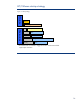
SDScript file modification example
If the virtual machines do not shut down before the VMware server shuts down, you might receive the
following warning:
Stopping VMware ESX Server services:
mkload_mod PANIC: vmfs3: Device or resource busy
To ensure that the virtual machines are properly shut down, you can modify the SDScript. For
example, to shut down a VMware ESX 3.0.1 server with one Microsoft® Windows® 2003 virtual
machine and one Red Hat Enterprise Linux 4.0 virtual machine, enter the following:
echo "Shutdown script has been executed." | wall
echo "PLEASE WAIT WHILE THE VIRTUAL MACHINES ARE BEING SHUT DOWN" | wall
/usr/bin/vmware-cmd /vmfs/volumes/47c2ce23-bad20214-7e49-
0016353ce250/Win\2K3\R2\SP2/Win\2K3\R2\SP2.vmx stop
/usr/bin/vmware-cmd /vmfs/volumes/47c2ce23-bad20214-7e49-
0016353ce250/RHEL4\U5/RHEL4\U5.vmx stop
Summary
This paper has detailed how the UPS, VMware ESX, and virtual machines can be configured to
interact during power failures. To configure additional settings, see the HP UPS Management Module
User Guide located on the HP website at
http://www.hp.com/go/rackandpower.