
HP UPS Management Module Installation and Configuration Guidelines for VMware ESX


14
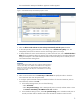
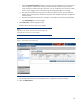
f. Select the Run Event Procedure checkbox to execute the event handling script on the server on
which the agent is installed and running. While the SDScript executes during a shutdown
event, the EVScript executes during a UPS event. You can modify the script content to enable
actions such as logging events in the system log and sending messages to a recipient.
g. Enter the total estimated time required to shut down the VMware server. This should be the
longest guest operating system shutdown time plus the time needed to shut down the VMware
Service Console.
h. Enter the estimated time required to run shutdown commands in the Execute Command field.
i. Click Save Changes to save the changes.
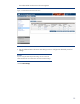
6. Click Power Fail in the left navigation frame.
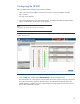
The Basic tab on the Power Fail screen appears.
Note:
Depending on the specific UPS model, some features might not be
supported. The screen shown is only an example.
Figure 11. Basic tab on the Power Fail screen
7. Use the Basic tab on the Power Fail Settings screen to configure the power fail settings.
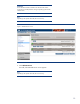
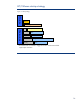
8. Select the Advanced tab.