
HP UPS Management Module Installation and Configuration Guidelines for VMware ESX


13
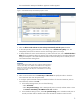
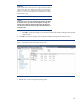
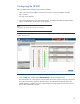
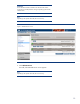
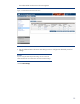
Figure 10. Add / Edit Attached Device screen
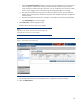
5. On the Edit/Delete Device screen:
a. Enter the VMware server name or description in the Description field.
b. Select the type of device in the Type dropdown box:
– Remote Agent—Select Remote Agent when communicating with an agent through a
network connection.
– Serial Agent—Select Serial Agent when communicating with an agent through a serial
connection.
– Storage Device—Select Storage Device when attaching a shared hard disk storage device
to a UPS load segment. Storage devices have the longest runtime so servers accessing this
device can save data before shutting down.
– Other Device—Select Other Device for any unmanaged device, such as a router or hub.
Unmanaged devices are either on or off and are not shut down gracefully.
c. If output power is supplied by controllable load segments, select the load segment to which
the device is attached in the Load dropdown box. Depending on your UPS model, the
number of available load segments varies.
d. If the device type is Remote Agent, enter the IP address of the machine that hosts the agent in
the IP Address field.
-or-
If the device type is Serial Agent, select the serial connector on the management module to
which the agent is connected in the Management Module Serial Port dropdown box.
e. To run an optional command during a utility power failure, select the Run Command
Procedure (SDScript)? checkbox. For more information about SDScripts, see the HP UPS
Management Module User Guide located on the HP website at
http://www.hp.com/go/rackandpower.