
HP UPS Management Module Installation and Configuration Guidelines for VMware ESX


11
Configuring the HPMM
After the HPMM and its software components are installed:
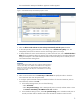
1. Open a browser to the IP address of the Service Console on which the HPMM is installed:
https://ipaddress
The Login screen appears.
2. Log in to the HPMM with a user name and password. The default credentials are admin/admin.
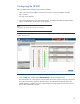
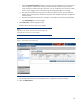
After a successful login, the Overview screen appears.
Note:
Depending on the specific UPS model, this screen will vary.
Figure 8. Overview screen
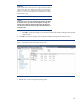
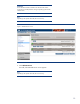
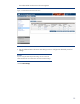
3. Click the Setup tab, and then select Attached Devices in the left navigation frame.
The Attached Devices screen appears. The estimated UPS runtime appears at the top of the screen.
The total time required to shut down the entire UPS is recalculated when attached devices are
added, deleted, or modified. This time is determined by the single largest time necessary to shut
down a device attached to the UPS.