
HP UPS Management Module Installation and Configuration Guidelines for VMware ESX

10
IMPORTANT:
Careful consideration should be used when configuring shutdown delays in
VMware. These delays are in addition to the shutdown time configured in
HPMM. For simplicity, HP recommends that the VMware shutdown delay
be set to zero. You can use the delay time on the HPMM menu to manage
delayed shutdown time.
CAUTION:
You must enter a time value in the Shutdown Delay field when you change
the shutdown action or you cannot save the changes. If you change the
shutdown action setting from outside the vSphere Client, the changes are
only reflected in the Autostart Settings manager if the shutdown delay is a
nonnegative value.
c. Click OK to accept the changes to the automatic startup and shutdown settings of the selected
virtual machine.
8. Click OK to accept the changes to the startup and shutdown settings of the VMware server.
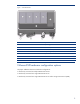
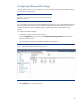
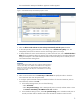
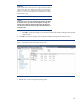
Figure 7. Virtual Machine Startup and Shutdown settings window
9. Repeat steps 1-8 for each guest operating system.