
Use Guide - 5th Chapter: Problem Solving



Chapter 5 Problem solving 160
Checking the printer configuration
File directory page
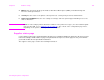
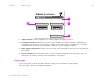
The file directory page contains the following information:
1 Disk Information indicates the disk model number, serial number, capacity, available free space, and
whether you might write to the disk.
2 File Size column indicates the size of each file under the Directory/File Name column. If a directory is
listed on the line, then Directory appears in this column, and its path is listed in the Directory/File Name
column.
3 Directory/File Name indicates the name of the file. Files in a subdirectory are listed right after the directory
line. The files are not necessarily listed in alphabetic order.
1
2
3