
Use Guide - 5th Chapter: Problem Solving


Chapter 5 Problem solving 143
Correcting output quality problems
Paper size adjustment and
installation.
See the introduce guide on the product CD, or go to www.hp.com/cposupport/
.
Printer does not recognize the
duplex printing accessory.
z Print a configuration page to ensure that the duplex printing accessory is installed
properly (See “Configuration page” on page 155).
z Turn the printer off. Remove and reinstall the unit. Turn the printer on.
z Make sure that the duplex printing accessory has been configured in the printer
driver.
Printer does not recognize the
hard disk.
Turn the printer off and verify that the hard disk is inserted correctly and is securely
fastened.
Printer does not recognize
optional Tray 4.
z Make sure you selected optional Tray 4 in the printer driver (See “Helpful printer
software for increased printing flexibility” on page 17).
z Turn the printer off and then back on.
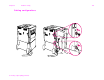
z Make sure the power cord is plugged into optional Tray 4 (See “Cabling
configurations” on page 148).
z If the printer still does not recognize optional Tray 4, contact your dealer or
authorized HP service provider.
Printer does not recognize stapler. Check the cable to the stapler. Make sure it is properly connected at both ends (See
“Cabling configurations” on page 148).
Situation Solution