
Use Guide - 5th Chapter: Problem Solving


Chapter 5 Problem solving 123
Correcting output quality problems
Correcting output quality problems
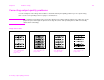
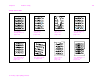
Use the examples in the image defect table to determine which print quality problem you are experiencing,
then see the corresponding reference pages to troubleshoot.
Note The examples below depict letter-size paper that has passed through the printer long-edge first. (If the
paper has passed through the printer short-edge first, lines and repeating defects will run vertically
rather than horizontally.)
Image defect table
See “Light print
or fade” on
page 125
See “Specks” on
page 125
See “Dropouts”
on page 125
See “Lines” on
page 125