
Use Guide - 5th Chapter: Problem Solving


Chapter 5 Problem solving 116
Understanding printer messages
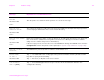
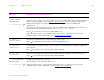
22 PARALLEL I/O
BUFFER OVERFLOW
alternates with
To continue press
Too much data was sent to the parallel port.
Check for a loose cable connection, and be sure to use a high-quality cable. (See the introduce
guide on the product CD, or go to www.hp.com/cposupport/
.) (Some non-HP parallel cables
might be missing pin connections or might otherwise not conform to the IEEE-1284
specification.)
This error can occur if the driver you are using is not IEEE-1284 compliant. For best results, use
the HP driver that came with the printer (See “Printer drivers” on page 20).
Press to clear the error message. (Data will be lost.)
If this message persists, contact an HP-authorized service or support provider. (See the
introduce guide on the product CD, or go to www.hp.com/cposupport/
.)
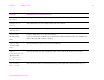
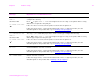
22 SERIAL I/O
BUFFER OVERFLOW
The printer serial buffer has overflowed during a busy state.
Press to print the transferred data. (Some data might be lost.)
40 BAD SERIAL
TRANSMISSION
A serial data error (parity, framing, or line overrun) occurred during the reception of data from
the computer.
Press to clear the error message and continue printing.
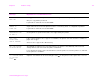
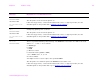
40 EIO x BAD
TRANSMISSION
The connection between the printer and the EIO card in the specified slot has been broken.
Press to clear the error message and continue printing.
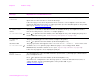
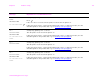
41.x PRINTER ERROR
alternates with
To continue press
A temporary printing error occurred.
Turn the printer off, then turn the printer on.
If this message persists, contact an HP-authorized service or support provider. (See the
introduce guide on the product CD, or go to www.hp.com/cposupport/
.)
Message Explanation or recommended action