
Administrator's Guide



ENWW Security Features 83
Using Security Features
Access to HP Jetdirect configuration parameters can be controlled through
combined use of the available security features. Table 5.2
provides examples
of various settings and the associated level of access control.
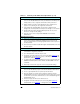
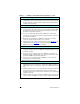
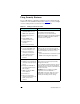
Table 5.2 Settings for Access Control
Settings Level of Access Control
● Accessible through HTTP
(embedded Web server) or
SNMP v1/v2c applications
● Administrator password
not set
● Default SNMP v1/v2c
community names used
● No authentication or
encryption
● Access control list empty
Low
Best suited for trusted environments.
Any system can access the HP Jetdirect
configuration parameters through the embedded
Web server or SNMP management software.
Passwords are not required.
● Administrator password set
● User-specified SNMP v1/v2
Set Community Name set
● The Access Control List
contains host entries and
checks HTTP connections
● Non-secure protocols
disabled.
Medium
Limited security for non-trusted environment.
If the Administrator password and SNMP v1/v2c
Set Community Name are known, access is
limited to:
● systems listed in the Access Control List, and
● SNMP v1/v2c management applications
● Unused protocols disabled
● HTTPS access enabled using
certificates issued by trusted
sources
● Configured for EAP/802.1x
server-based authentication
and encryption
● SNMP v3 enabled, SNMP
v1/v2c disabled
● Passwords set
● The Access Control List
contains specified entries and
HTTP connections are
checked
High
High security for non-trusted, professionally
managed environments.
Access is limited to authenticated hosts that are
specified in the Access Control List. Encryption
provides data privacy; network communication in
plain-text is not used.
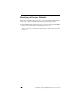
CAUTION: Power-on settings (for example,
configurations from a BootP/TFTP or
DHCP/TFTP server) may change the server’s
settings when it is power-cycled. Be sure to
confirm your intended power-on settings.