
Administrator's Guide



ENWW Using the Embedded Web Server 50
HP Jetdirect Home Tab
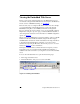
The HP Jetdirect projector server’s product model, firmware version, and
network addresses are displayed along with any device information that can
be retrieved. Table 4.1
provides a summary of the items displayed on the
HP Jetdirect home page.
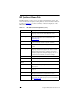
Table 4.1 HP Jetdirect Home Page Items (1 of 2)
Item Description
Home tab Provides access to server/projector information and
language selection for the embedded web server.
Networking tab Provides access to network configuration, security, and
diagnostic parameters. For more information, see
N
etworking Tab.
Projector tab Provides control of projector power, selection of the input
source, and setup of alerts for specific conditions.
Device Info Displays information about the projector and the Jetdirect
server.
Select Language Appears if the HP Jetdirect Web pages support multiple
languages. Supported languages may also be selected
through language preference settings in your browser.
To display supported non-English languages, the use of
cookies must be enabled in your browser settings.
Device Displays the projector model or series.
Status Displays the projector’s power status.
Projector Serial
Number
Displays the projector’s serial number.
Firmware Version The version of the operating instructions installed on the
HP projector.
Current Lamp Hours Displays the cumulative number of hours that the lamp has
been on.
Current Input Source Displays the input port currently selected on the projector.
The signal on this port is projected on the screen.
Host Name Specifies the IP host name assigned to the device and
stored on the HP Jetdirect projector server. See TCP/IP on
the N
etworking Tab.