
HP Scripting Toolkit 9.10 for Linux User Guide


Table Of Contents
- HP Scripting Toolkit for Linux User Guide
- Contents
- 1 Introduction
- 2 Deployment using the Scripting Toolkit
- 3 Booting and OS installation
- 4 Scripting Toolkit utilities
- Native package formats
- Syntax conventions
- Utility online help
- Using Scripting Toolkit utilities
- Using REBOOT
- Using SETBOOTORDER
- Using STATEMGR
- Using RBSURESET
- Using BOOTEXTRACT
- Using HPDISCOVERY
- Using IFHW
- Using HWQUERY
- Using CONREP
- CONREP command-line syntax
- CONREP command line arguments
- CONREP return codes
- CONREP screen output
- CONREP -s (Store to Data file) Example usage for HP ProLiant servers not using the Oxx ROM family
- CONREP –l (Load from Data File) Example Usage for HP ProLiant servers not using the Oxx ROM family
- CONREP Data File Sample Contents for HP ProLiant servers not using the Oxx ROM family
- CONREP command file contents for HP ProLiant servers not using the Oxx ROM family
- Using HPRCU
- Using HPACUSCRIPTING
- Using HPLPCFG
- Using LO100CFG
- Using HPQLAREP
- Using HPONCFG
- 5 Troubleshooting
- 6 Support and other resources
- 7 Documentation feedback
- Acronyms and abbreviations
- Index
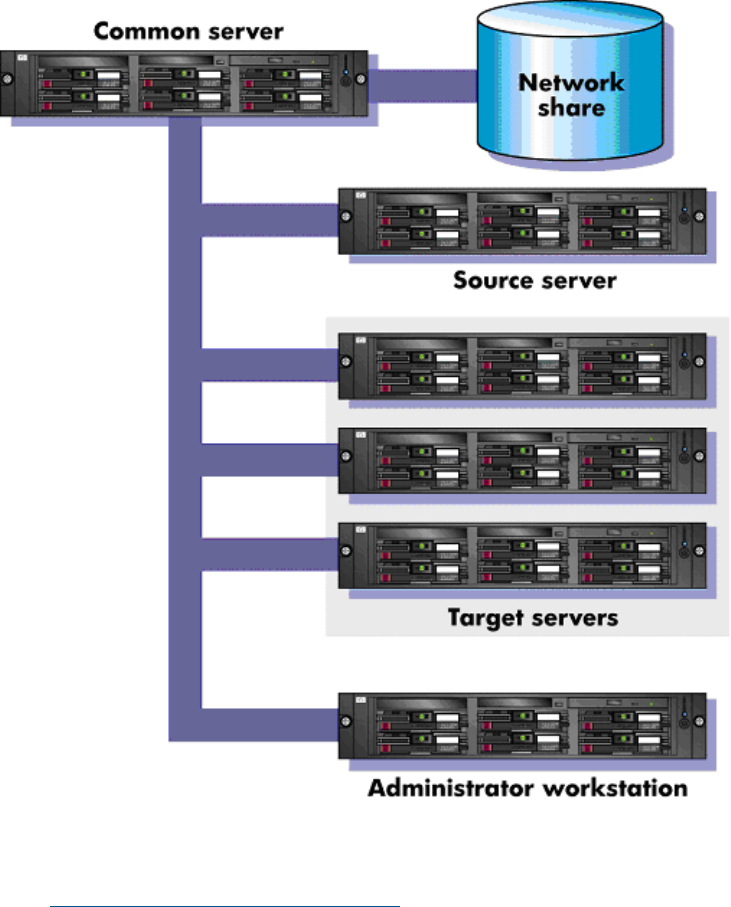
Creating a network share
To create a network share:
1. Download the appropriate Scripting Toolkit package from the Scripting Toolkit website at
(http://www.hp.com/go/ProLiantSTK).
2. Extract the package on a common server that resides on the same network as the servers to
be deployed.
3. Use the Linux NFS Server Configuration Tool to share the directory in which you extracted the
Toolkit package and to assign read and write permissions for all hosts.
Capturing a reference configuration from the source server
1. At the source server, boot the media (CD/DVD, USB drive key, or PXE) that contains the custom
Linux Toolkit image.
2. At the boot prompt, type bash, and then press Enter. When the process is complete, a
command prompt appears.
3. Load the network drivers using the loadnet script:
/loadnet.sh
4. Load appropriate storage controller drivers:
modprobe -f cciss
5. Load the channel interface driver for iLO:
Sample deployment procedure 9