
HP Scripting Toolkit 9.10 for Linux User Guide
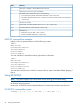
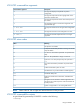
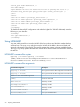


Table Of Contents
- HP Scripting Toolkit for Linux User Guide
- Contents
- 1 Introduction
- 2 Deployment using the Scripting Toolkit
- 3 Booting and OS installation
- 4 Scripting Toolkit utilities
- Native package formats
- Syntax conventions
- Utility online help
- Using Scripting Toolkit utilities
- Using REBOOT
- Using SETBOOTORDER
- Using STATEMGR
- Using RBSURESET
- Using BOOTEXTRACT
- Using HPDISCOVERY
- Using IFHW
- Using HWQUERY
- Using CONREP
- CONREP command-line syntax
- CONREP command line arguments
- CONREP return codes
- CONREP screen output
- CONREP -s (Store to Data file) Example usage for HP ProLiant servers not using the Oxx ROM family
- CONREP –l (Load from Data File) Example Usage for HP ProLiant servers not using the Oxx ROM family
- CONREP Data File Sample Contents for HP ProLiant servers not using the Oxx ROM family
- CONREP command file contents for HP ProLiant servers not using the Oxx ROM family
- Using HPRCU
- Using HPACUSCRIPTING
- Using HPLPCFG
- Using LO100CFG
- Using HPQLAREP
- Using HPONCFG
- 5 Troubleshooting
- 6 Support and other resources
- 7 Documentation feedback
- Acronyms and abbreviations
- Index

<serial_port mode="dedicated" />
<nic mode="dhcp">
<ipv4 address="10.10.10.18" mask="255.255.252.0" gateway="10.10.10.1" />
<firewall http_active="yes" ping_active="yes" telnet_active="yes" />
</nic>
<users>
<user id="1" name="" privilege_level="user" />
<user id="2" name="operator" privilege_level="operator" />
<user id="3" name="admin" privilege_level="admin" />
<user id="4" name="oem" privilege_level="oem" />
</users>
</lo100cfg>
To disable the shared NIC configuration and make the Lights-Out 100 NIC dedicated, enter the
following in your data file:
<lo100cfg>
<nic type="dedicated" />
</lo100cfg>
Using HPQLAREP
You must edit the text file to insert the WWID of the boot volume and the LUN number that they
will boot from. The hpqlarep utility discovers the WWID of the HBA in the server blade and
writes the information in the text file. The text file presents the options in human readable format.
The hpqlarep utility updates the hardware with the boot volume WWID and boot LUN read from
the text file.
HPQLAREP command-line syntax
hpqlarep /s filename hpqlarep /l filename
[HBA0] WWID=11223344 HostAdapterBiosEnable=1 SelectBootEnable=1
BootDeviceWWID=22334455 BootDeviceLUN[0]=1111
HPQLAREP command-line arguments
DescriptionCommand-line argument
This argument saves the HBA configuration to the filename.
hpqlarep /s filename
This argument loads the HBA configuration to the filename.
hpqlarep /l filename
Where filename has the following format:
Section for each HBA
[HBA0]
Read-only variable
WWID=11223344
Read-only variable
HostAdapterBiosEnable=1
Read-only variable
SelectBootEnable=1
Your input
BootDeviceWWID=22334455
Your input and default LUN
BootDeviceLUN[0]=1111
54 Scripting Toolkit utilities