
HP Scripting Toolkit 9.10 for Linux User Guide
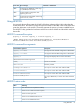
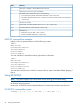
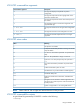
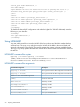
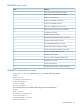
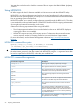
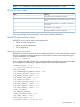


Table Of Contents
- HP Scripting Toolkit for Linux User Guide
- Contents
- 1 Introduction
- 2 Deployment using the Scripting Toolkit
- 3 Booting and OS installation
- 4 Scripting Toolkit utilities
- Native package formats
- Syntax conventions
- Utility online help
- Using Scripting Toolkit utilities
- Using REBOOT
- Using SETBOOTORDER
- Using STATEMGR
- Using RBSURESET
- Using BOOTEXTRACT
- Using HPDISCOVERY
- Using IFHW
- Using HWQUERY
- Using CONREP
- CONREP command-line syntax
- CONREP command line arguments
- CONREP return codes
- CONREP screen output
- CONREP -s (Store to Data file) Example usage for HP ProLiant servers not using the Oxx ROM family
- CONREP –l (Load from Data File) Example Usage for HP ProLiant servers not using the Oxx ROM family
- CONREP Data File Sample Contents for HP ProLiant servers not using the Oxx ROM family
- CONREP command file contents for HP ProLiant servers not using the Oxx ROM family
- Using HPRCU
- Using HPACUSCRIPTING
- Using HPLPCFG
- Using LO100CFG
- Using HPQLAREP
- Using HPONCFG
- 5 Troubleshooting
- 6 Support and other resources
- 7 Documentation feedback
- Acronyms and abbreviations
- Index

LO100CFG command-line arguments
DescriptionCommand-line argument
This argument displays example XML to perform
configuration.
-x
This argument outputs the current copyright and version
information and then exits.
-v
This argument captures the current status and outputs it to
the console.
-s
The argument lists basic command line arguments and
supported XML tags.
-h
This argument loads and runs the given XML configuration
file.
-i "file.xml"
This argument saves the current configuration to a file.
-o "file.xml"
This argument has been deprecated and is no longer
supported.
-k "<xml/>"
LO100CFG return codes
MeaningValue
All operations succeeded.
0
A required command-line parameter is missing. See console
output for details.
10
An unknown command-line parameter was passed to the
utility.
12
File error. The specified file is empty or not found.
14
Syntax error. You must specify exactly one option from -i
-o -s.
16
An invalid command-line parameter was passed to the
utility.
17
Invalid command-line syntax was used.
18
The IPMI driver may not be loaded or installed properly.
50
XML failed validity tests.
101
Field in the XML file has invalid values. Valid fields still
applied.
102
The Lights Out 100 returned a code the application did
not expect. See console output for code returned from the
LO100 processor.
103
System is unsupported or is not running IPMI drivers.
104
NOTE: Return codes of 100 or higher are returned from the LO100 processor.
LO100CFG command-file contents
A typical data file generated by LO100CFG is similar to the following:
<lo100cfg>
Using LO100CFG 53