
HP Scripting Toolkit 9.10 for Linux User Guide
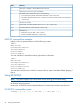
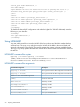
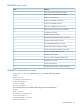
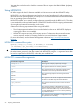
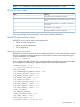


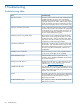
Table Of Contents
- HP Scripting Toolkit for Linux User Guide
- Contents
- 1 Introduction
- 2 Deployment using the Scripting Toolkit
- 3 Booting and OS installation
- 4 Scripting Toolkit utilities
- Native package formats
- Syntax conventions
- Utility online help
- Using Scripting Toolkit utilities
- Using REBOOT
- Using SETBOOTORDER
- Using STATEMGR
- Using RBSURESET
- Using BOOTEXTRACT
- Using HPDISCOVERY
- Using IFHW
- Using HWQUERY
- Using CONREP
- CONREP command-line syntax
- CONREP command line arguments
- CONREP return codes
- CONREP screen output
- CONREP -s (Store to Data file) Example usage for HP ProLiant servers not using the Oxx ROM family
- CONREP –l (Load from Data File) Example Usage for HP ProLiant servers not using the Oxx ROM family
- CONREP Data File Sample Contents for HP ProLiant servers not using the Oxx ROM family
- CONREP command file contents for HP ProLiant servers not using the Oxx ROM family
- Using HPRCU
- Using HPACUSCRIPTING
- Using HPLPCFG
- Using LO100CFG
- Using HPQLAREP
- Using HPONCFG
- 5 Troubleshooting
- 6 Support and other resources
- 7 Documentation feedback
- Acronyms and abbreviations
- Index

MeaningValue
There was no adapter or Emulex HBA found on this host.
5
There was an error retrieving the I/O address.
6
The WWID was invalid because of one of the following:
7
• An invalid value for WWID and BootDeviceWWID, and not a hex value
• The WWID specified for HBA in the .ini file does not match any HBAs found on the host (for the
/l option only)
The LUN was invalid.
8
Invalid value; for enable/disable value is not 0 or 1 (for /l option only)
0x10
Incorrect iboot BIOS code loaded (for /l option only)
0x11
General error:
0xFF
• Initialization error (for both /l and /s option)
• Cannot read HBAs WWPN (for /s option only)
HPLPCFG command-line examples
hplpcfg /s hba.ini generates hba.ini with the following content:
[HBA0]
WWID=11111111
HostAdapterBiosEnable=1
SelectBootEnable=1
BootDeviceWWID=
BootDeviceLUN[0]=
You must edit hba.ini and add the following boot device information:
[HBA0]
WWID=11111111
HostAdapterBiosEnable=1
SelectBootEnable=1
BootDeviceWWID=22222222
BootDeviceLUN[0]=3
You must then invoke the tool to load the contents of hba.ini input to the HBA NVRAM: hplpcfg /l
hba.ini.
Using LO100CFG
NOTE: This section applies only to HP ProLiant servers not using the Oxx ROM family.
The LO100CFG utility enables you to configure the Lights Out 100 device that is available on the
HP ProLiant 100 series servers.
Under Linux, LO100CFG uses the OpenIPMI library to communicate with the system firmware.
LO100CFG command-line syntax
lo100cfg [ -h | -x | -v | -i "file.xml" | -o "file.xml" | -s ]
52 Scripting Toolkit utilities