
HP Scripting Toolkit 9.10 for Linux User Guide
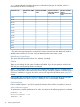
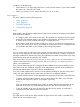
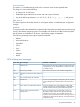
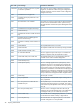
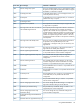
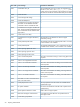
Table Of Contents
- HP Scripting Toolkit for Linux User Guide
- Contents
- 1 Introduction
- 2 Deployment using the Scripting Toolkit
- 3 Booting and OS installation
- 4 Scripting Toolkit utilities
- Native package formats
- Syntax conventions
- Utility online help
- Using Scripting Toolkit utilities
- Using REBOOT
- Using SETBOOTORDER
- Using STATEMGR
- Using RBSURESET
- Using BOOTEXTRACT
- Using HPDISCOVERY
- Using IFHW
- Using HWQUERY
- Using CONREP
- CONREP command-line syntax
- CONREP command line arguments
- CONREP return codes
- CONREP screen output
- CONREP -s (Store to Data file) Example usage for HP ProLiant servers not using the Oxx ROM family
- CONREP –l (Load from Data File) Example Usage for HP ProLiant servers not using the Oxx ROM family
- CONREP Data File Sample Contents for HP ProLiant servers not using the Oxx ROM family
- CONREP command file contents for HP ProLiant servers not using the Oxx ROM family
- Using HPRCU
- Using HPACUSCRIPTING
- Using HPLPCFG
- Using LO100CFG
- Using HPQLAREP
- Using HPONCFG
- 5 Troubleshooting
- 6 Support and other resources
- 7 Documentation feedback
- Acronyms and abbreviations
- Index

ConnectionName
This option is a user-defined string used as the connection name for the specified HBA.
The string can consist of the following:
• A maximum of 16 characters
• Embedded space characters but cannot end with a space character
• Any of the following characters: a–z, A–Z, 0–9, !, @, #, *, (, ), -, _, +, :, ., /, and [space]
HBA_WW_ID
This option specifies which HBA, based on its assigned WWN, is modified by the configuration
changes.
HostMode
This option specifies the HostMode for a selected HBA. Setting the Host Mode optimizes the storage
array for the selected operating system. The available host modes for an HBA are device-specific.
Not all modes are available on all devices. Not all HBAs support a HostMode.
The following operating system options might be available:
• Default
• Microsoft Windows
• OpenVMS
• Tru64
• Linux
• Solaris
• Netware
• HP-UX
ACU scripting error messages
Comment or clarificationError messageError code
The ACU process cannot be initiated. You might see this error
message if you are not authenticated to use ACU or if ACU
is already running.
General error.1
ACU cannot save one or more controller configurations.Error saving controller.268
—Controller is locked by another machine or
user.
278-282
—Error communicating with controller.290
An error occurred during the configuration process, but ACU
cannot identify the error because there is an internal ACU
error.
Internal error.516
This error message occurs if you attempt to add an odd
number of drives to an array that has RAID 1 logical drives,
and the controller does not support RAID-level migration.
Array requires an odd number of drives.1052
This error message occurs if a script that is running in
Reconfigure action mode lists fewer physical drives than
Cannot remove physical drives from
existing array.
1053
already exist in the array. ACU interprets this script as a
request to remove physical drives from an existing array, but
satisfying this request causes data loss, so ACU prevents the
script from running.
Using HPACUSCRIPTING 47