
HP Scripting Toolkit 9.10 for Linux User Guide
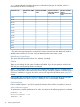
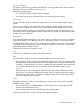
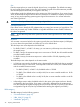
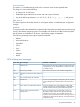
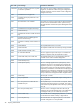
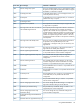
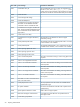
Table Of Contents
- HP Scripting Toolkit for Linux User Guide
- Contents
- 1 Introduction
- 2 Deployment using the Scripting Toolkit
- 3 Booting and OS installation
- 4 Scripting Toolkit utilities
- Native package formats
- Syntax conventions
- Utility online help
- Using Scripting Toolkit utilities
- Using REBOOT
- Using SETBOOTORDER
- Using STATEMGR
- Using RBSURESET
- Using BOOTEXTRACT
- Using HPDISCOVERY
- Using IFHW
- Using HWQUERY
- Using CONREP
- CONREP command-line syntax
- CONREP command line arguments
- CONREP return codes
- CONREP screen output
- CONREP -s (Store to Data file) Example usage for HP ProLiant servers not using the Oxx ROM family
- CONREP –l (Load from Data File) Example Usage for HP ProLiant servers not using the Oxx ROM family
- CONREP Data File Sample Contents for HP ProLiant servers not using the Oxx ROM family
- CONREP command file contents for HP ProLiant servers not using the Oxx ROM family
- Using HPRCU
- Using HPACUSCRIPTING
- Using HPLPCFG
- Using LO100CFG
- Using HPQLAREP
- Using HPONCFG
- 5 Troubleshooting
- 6 Support and other resources
- 7 Documentation feedback
- Acronyms and abbreviations
- Index

A "+" indicates that the specified cache ratio is allowed for that type of controller, while a "–"
indicates that the ratio is not allowed.
All other controllers
without
battery-backed write
cache
All other controllers
with battery-backed
write cache
RA4x00 with 48MB
cache
RA4x00 with 16MB
cache
Read:write ratio
++++100:0
––++90:10
––++80:20
–+––75:25
––++70:30
––++60:40
–+++50:50
––+–40:60
––+–30:70
–++–25:75
–––+0:50*
––+–0:75*
–+––0:100
* The cache ratio percentages do not total 100 in these cases because the additional 16-MB or
48-MB cache modules are not used. Only the battery-backed write cache is used.
RebuildPriority, ExpandPriority
This option has three possible values: Low, Medium, and High.
SSPState
There are two settings for this option: Enable and Disable. If you do not specify a value for the
SSP State, the existing setting remains unchanged.
NOTE: The SSPState option is valid only for controllers that enable SSP on a controller basis,
such as the MSA1000 or the Smart Array Cluster Storage controllers. RA4x00 controllers support
SSP that is enabled on a logical drive basis, and use the LogicalDriveSSPState option (page 45)
instead.
If you enable SSP, you must also specify an adapter for one or more logical drives by using the
SSPAdaptersWithAccess option (page 46). Otherwise, SSP is automatically disabled.
SurfaceScanDelay
Enter a number between 1 and 30 to specify the duration of the surface scan delay in seconds.
Video performance options
To optimize the controller performance for video, set values for the following options as indicated:
DPOEnable = No
ElevatorSortEnable = Yes
IRPEnable = No
42 Scripting Toolkit utilities